
Many SEO experts or companies suggest creating multiple webpages to target the same keywords. However, this approach can harm your website’s rankings on Google, as targeting multiple pages for the same keywords is not a recommended practice.
This technique puts Google Search in a dilemma when trying to determine which page is the most relevant for a query. Let us help you understand what keyword cannibalization is and how to fix it to prevent Google penalties.
What is keyword cannibalization?
In simple terms, creating and targeting multiple pages on your website for similar keywords is called keyword cannibalization. In such cases, Google can become confused about which page should rank for a given query. While one page with the most relevant content may rank higher, others are pushed down, creating internal competition among your webpages in search results.
For an example,
Let’s take Amazon mobile product pages as an example. On an e-commerce website, multiple URLs are often created through filters and other search parameters. This can result in several pages targeting the same products with very similar content.
If you search on Google using the query below, you’ll notice that multiple pages from the same website may rank for the same search term.
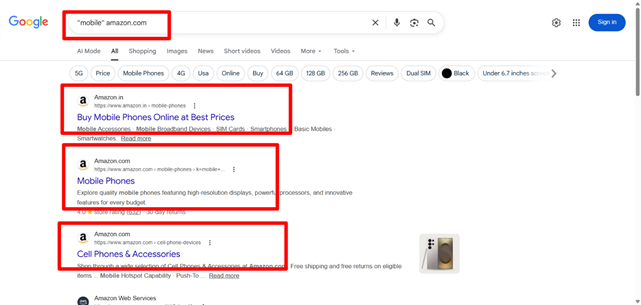
This isn’t limited to e-commerce websites. Many companies create similar static pages for the same services and target them with nearly identical metadata. This can lead to a keyword cannibalization issue. One of the most common examples is targeting the same keywords on both the website homepage and a service page.
When can SEO keyword cannibalization occurs?
- Publishing similar content repeatedly
- Creating and publishing a new version of a webpage without implementing a 301 redirect from the old one
- Adding similar products across multiple categories
- Optimizing multiple webpages for the same or very similar keywords
- Optimizing only category pages while neglecting subcategory and product pages
- Not using canonical tag for similar webpages
Is keyword cannibalization bad and can hurt SEO?
Yes, keyword cannibalization is bad for SEO and can hurt your ranking on Google and other search engines.
For example, imagine we have two pages and both are targeting the same keywords. One of them ranks in position #1, while the other page—which you actually we prefer to rank—is not visible in search results. At first glance, this may look like classic keyword cannibalization, where one page is “competing against” or suppressing the other.
However, even if that is true for a single keyword, both pages may still rank for hundreds of other keywords.
In such cases, focusing only on one keyword can be misleading. The reality is that there may not be a real cannibalization problem affecting overall performance. If you merge or remove one of the pages, you could lose rankings for other valuable keywords, which may ultimately lead to a net decrease in organic traffic.
Here is how keyword cannibalization can hurt SEO:
- Lower rankings: Google usually doesn’t show too many pages from the same website for one search query. If you have multiple webpages targeting the same keyword, they may all rank lower because none of them stands out.
- Split backlinks: Instead of one strong page getting all the backlinks from other websites, the backlinks get divided between similar pages. This makes each page weaker and harder to rank on Google searches.
- Search engine confusion: Google may get confused about which page should be considered the main one to rank on the top. This can lead to unstable or fluctuating ranking.
- Lower clicks (CTR): If multiple similar pages from your website appear in search results, users may click on less relevant or lower-performing pages. This can reduce the total number of clicks each page receives, leading to a drop in overall performance.
How to find keyword cannibalization issues?
To find keyword cannibalization issue, you need to perform a content audit of your website, you can use multiple ways.
- Perform a content audit of the website.
- Use the Google search command: site:yourdomain.com “keyword” to identify pages related to a specific keyword.
- Review Google Search Console to check whether your webpages are receiving traffic and impressions.
- Use tools to identify keyword cannibalization issues. Tools such as Website Rank Tracker, Ahrefs, or Semrush can help you track webpages that are ranking for the same keywords.
Run a site: search
You can use the Google search command site:yourdomain.com “keyword” to identify similar pages ranking on Google. This will show pages related to the search query. Create a list of ranking pages that offer similar services, as these may be targeting overlapping keywords, while some pages may target completely different keywords.
Check out the below search result:
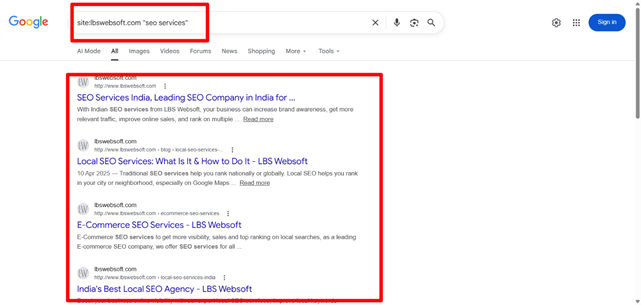
Each webpage offers different services and targets a unique user intent and search purpose.
What to check to find keyword cannibalization:
- Create a list of webpages and keywords where multiple pages are ranking within the top 100 search results.
- Identify cannibalized pages: URLs that are competing for the same keyword rankings with one or more other URLs.
- Canonical Tag: Check the canonical tags on webpages. Canonical tags should be implemented correctly on similar webpages with different URLs to avoid duplicate content issues. To detect keyword cannibalization, evaluate whether the pages are targeting the same search intent or fulfilling the same user need.
How to fix keyword cannibalization issues?
Canonicalize URLs – Creating static URL for every webpage and using proper canonical tag for dynamic, pagination and similar pages is the best way you can reduce your keyword cannibalization and duplicate webpage issue.
Below is the example of canonical tag:
<link rel=”canonical” href=”https://example.com/webpageurl”>
A canonical tag can be added for pages within the same domain or across different domains. When the canonical tag points to a page on the same domain, it is called a self-referential canonical tag and is commonly used for duplicate or similar pages within the same website. When it points to a page on another website or domain, it is called a cross-domain canonical tag.
When do you need canonicalization?
Dynamic URLs or Parameterized URLs: Many dynamic and e-commerce websites use parameters, filters, and dynamically generated URLs. In some cases, Google may index these parameter-based pages, which can lead to duplicate content and keyword cannibalization issues.
To avoid this, implement proper canonical tags on parameterized pages and point them to the main original webpage, which should have a self-referential canonical tag.
URL variants
Many websites use multiple URL variations. For example, a website may be accessible with “www” (http://www.abc.com) and without “www” (http://abc.com), or the homepage may load through different URLs such as http://www.abc.com and http://www.abc.com/index.html.
If proper 301 redirects or canonical tags are not implemented, these variations can create duplicate content issues. In such cases, canonical tags should be added to indicate the preferred or primary version of the webpage.
Other issues like webpage URL ending with /, without / etc.
Use 301 Redirection:
Why is a 301 redirect important? If multiple pages are targeting the same search intent, or if you create a new version of a webpage with a different URL while keeping the old page live, you should implement a 301 (permanent) redirect from the old page to the new one.
A 301 redirect helps preserve the webpage’s link equity, traffic, and rankings. Also, make sure your main landing page is properly linked from the website navigation, internal content, and other relevant sections of the site.
Duplicate Meta Tags:
Having duplicate meta tags across multiple webpages can also lead to keyword cannibalization issues. Make sure each webpage has unique meta tags and optimized content.
While performing on-page SEO, pay close attention to the following elements:
- Title Tag
- Webpage URL Structure
- H1 Tag
- Webpage Content
Review Webpage Duplicate Content:
Having similar content across multiple pages can cause keyword cannibalization issues. For example, this may occur when product descriptions are reused on multiple product pages, the same product is accessible through different URLs across categories, blog posts cover very similar topics, category pages lack proper pagination or canonical tags, or dynamic URLs generate duplicate versions of the same content.
You can use the Siteliner tool to identify duplicate internal pages on a website.
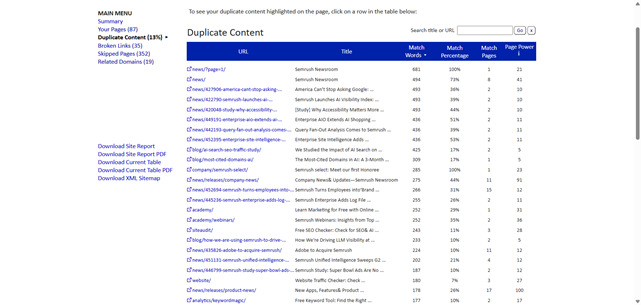
With the help of the Siteliner tool, you can get a list of webpages along with the number of matching words and the percentage of duplicate content across internal pages.
Monitor SERP Regularly:
Regularly monitor the SERPs to see which pages are ranking for a specific keyword. Analyze the search intent behind those pages and ensure there is no overlap in intent between your own pages.
Conclusion
Keyword cannibalization is a common but often overlooked SEO issue that can significantly impact your website’s performance in search results. When multiple pages compete for the same or similar keywords, it creates confusion for search engines, dilutes ranking potential, and reduces overall organic visibility.
However, it is not always a straightforward problem—careful analysis of search intent, keyword distribution, and page performance is essential before making any changes. Sometimes, what appears to be cannibalization may simply be different pages ranking for different intents or additional keyword opportunities.
The key to avoiding and fixing keyword cannibalization lies in maintaining a clear content structure, optimizing each page for a unique purpose, and using proper technical SEO practices such as canonical tags, 301 redirects, and unique metadata. Regular content audits, SERP monitoring, and tools like Google Search Console, Ahrefs, Semrush, or Siteliner can help you identify and resolve issues early.
By organizing your content strategically and ensuring each page serves a distinct user intent, you can improve rankings, strengthen authority, and maximize your website’s organic traffic potential.
To fix keyword cannibalization, you can hire experienced SEO experts.
